Introduction to MethodSCRIPT™
Why Scripting for Potentiostats?
MethodSCRIPT™ is a human-readable programmable language that runs directly on PalmSens’ latest generation of potentiostats and potentiostat modules.
The language supports all standard electrochemical techniques and allows you to combine, sequence, and customize them to build tailored measurement workflows. Once the device receives a script via PSTrace, a serial terminal, or your own custom software, it compiles and executes it on board with no pre-processing required from the host.
By shifting experimental logic and precise timing to the devices themselves, developers can rapidly integrate reliable and low-latency electrochemical applications into automated lab setups, embedded systems and finished end products.
Key Advantages for Developers
Shifting logic to the hardware provides several key advantages for developers:
-
Zero Communication Overhead: Sequence multiple techniques, (nested) loops, digital I/O triggers, and conditional logic into a single command to eliminate latency between the device and your software.
-
Precise Timing & Acquisition: Gain exact control over signal generation and data acquisition directly on the hardware.
-
Advanced On-Board Processing: Perform data smoothing, peak detection, and simple mathematical operations without host intervention.
-
Standalone Capability: Program devices to function independently of an active PC or smartphone connection, logging results to internal storage or an external SD card and managing low-power hibernation modes.
-
Unified Development: Use the same high-level commands across different hardware platforms, from portable wearables to high-end benchtop analyzers.*
-
Direct Peripheral Control: Directly manage GPIOs, I2C sensors, multiplexer channels, and auxiliary values like pH or temperature —even during an active measurement step— within your script.
Compatible Devices
MethodSCRIPT™ is supported by PalmSens’ latest generation of hardware including:
| Series | Models |
|---|---|
EmStat Pico |
EmStat Pico Module, EmStat Pico Core, and EmStat Pico MUX16 |
Sensit |
Sensit Smart, Sensit BT, and Sensit Wearable |
EmStat4 |
EmStat4S, EmStat4X, EmStat4R, EmStat4T, EmStat4 MUX, MultiEmStat4 and the OEM EmStat4M module |
Premium: |
Nexus |
Devices that do not support MethodSCRIPT™ can still be controlled with custom software using our many available SDKs.
|
Device-Specific Parameters
While MethodSCRIPT™ syntax is device-agnostic, hardware constraints vary between devices. Parameters such as compliance voltage limits and available current ranges differ significantly between devices and between LR (Low Range) and HR (High Range) models of those devices. Always consult Appendix B: Device-specific information in the MethodSCRIPT™ manual when defining ranges or potentials for your applications. |
Three Approaches to Development
Whether you are validating a new sensor or building a dedicated embedded device, PalmSens provides three distinct workflows to generate, test, and refine your scripts.
1. PSTrace for Windows: The Quick-Start Generator
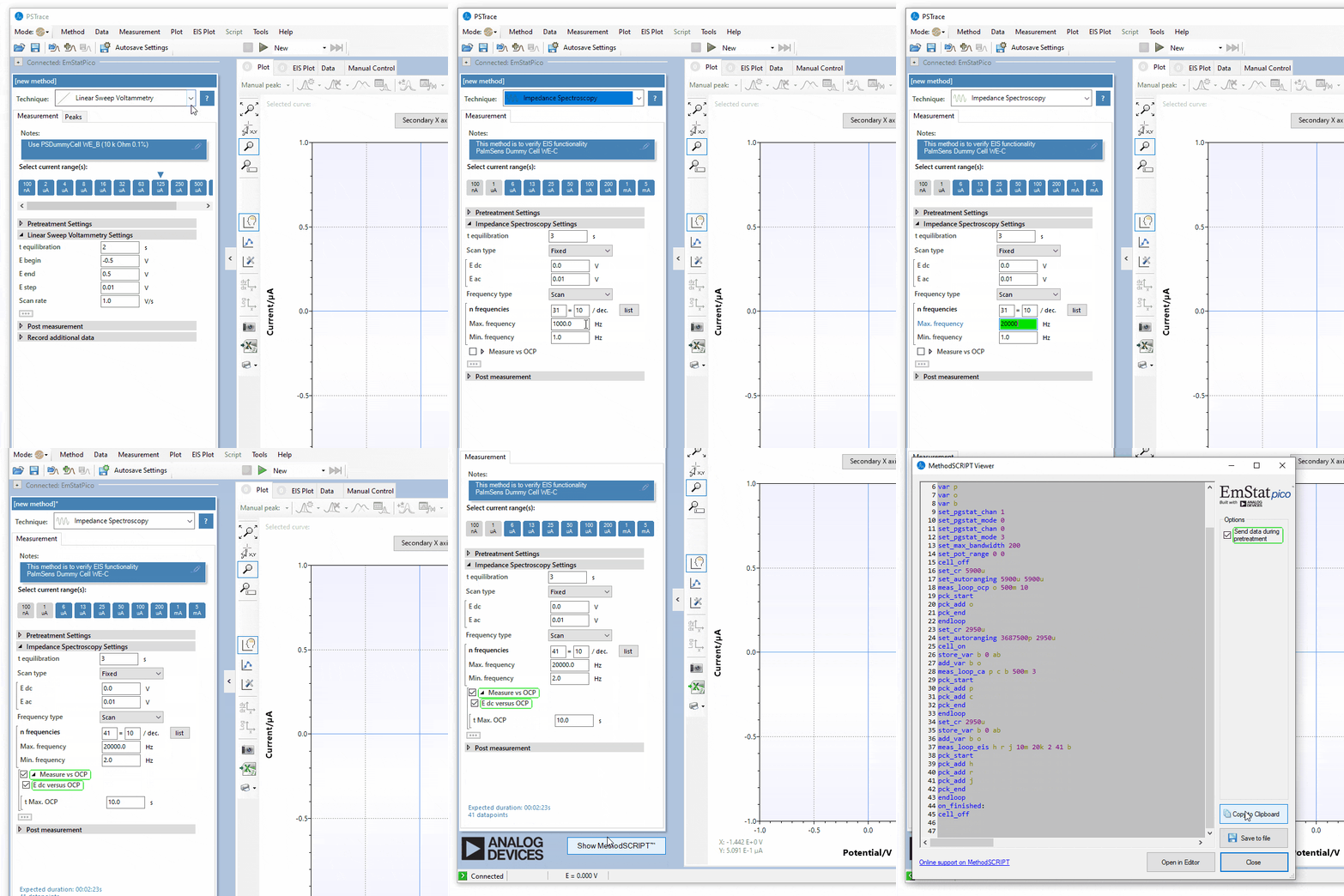
PSTrace is the most efficient route for developers transitioning from research to integration and way to translate electrochemical requirements into executable code. It serves as a known validated reference point for initial development.
-
Configure your application processes (e.g., Cyclic Voltammetry or EIS) and find the perfect electrochemical parameters for your specific application using the standard PSTrace GUI and verify it on physical hardware.
-
Click the Show MethodSCRIPT button in the Method Editor, visible if you are connected to any device supporting MethodSCRIPT™, to instantly view the script generated from your current settings. This eliminates guesswork regarding technique-specific arguments and ensures your electrochemical method is valid.
-
Copy the generated script directly from the window and paste it into your custom application code.
2. Visual MethodSCRIPT™ Editor: Workflow Prototyping
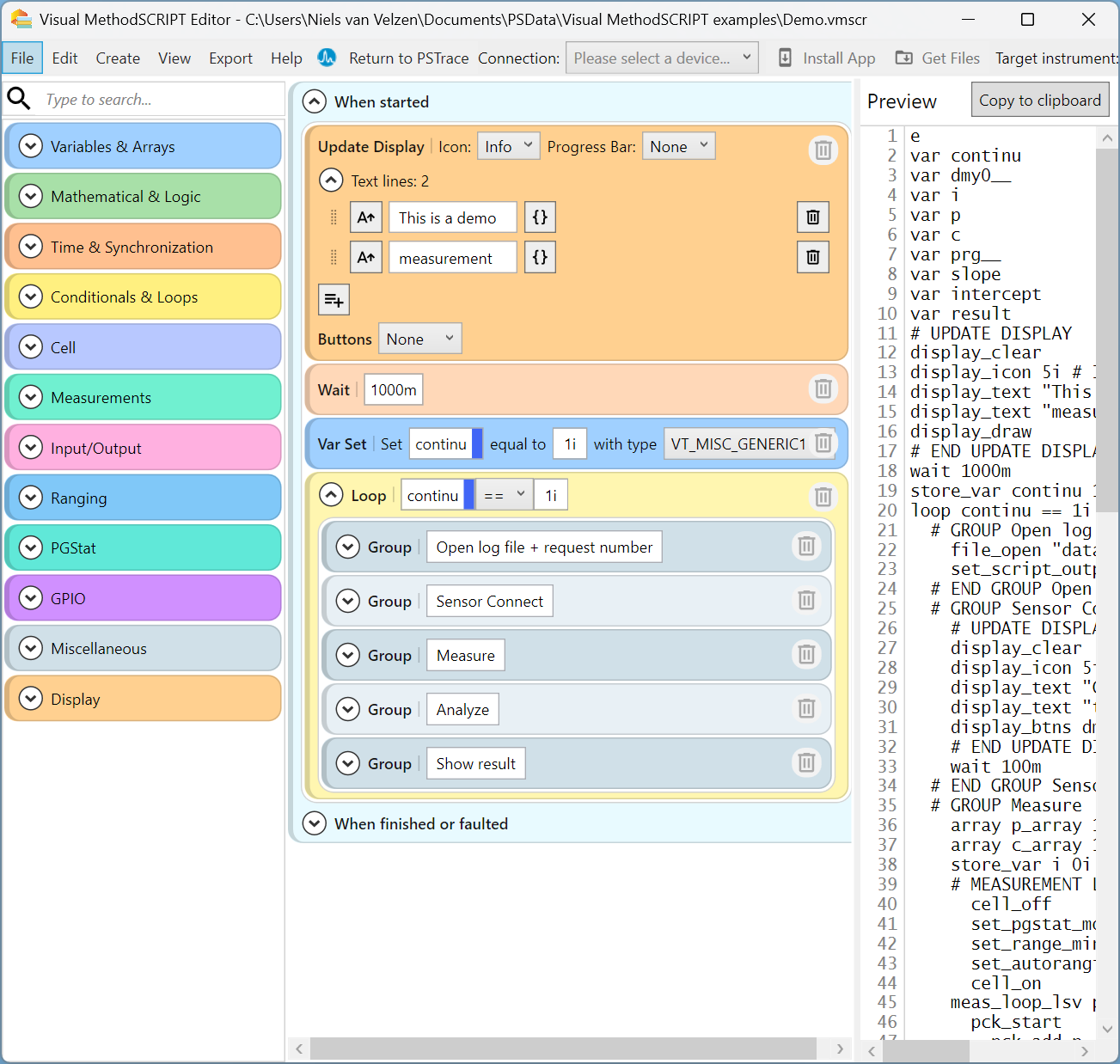
Built directly into PSTrace 5.12 and later versions, the Visual MethodSCRIPT™ Editor is a block-based environment designed for scripts that require complex decision-making and custom logic.
-
Use the scratch-like interface to drag-and-drop blocks for loops, conditional branching, and variable manipulation to build sophisticated workflows that can interact with user code during measurement iterations.
-
The visual interface offers speed and ensures syntax validity by preventing common coding errors like unbalanced parentheses or mismatched argument types.
-
Save the resulting script for use in your application or in the case of the EmStat4T, build standalone, wizard-style apps, allowing the device to run complex workflows with custom user-facing text and icons entirely via its built-in touchscreen.
3. Online MethodSCRIPT™ Editor: The Full-Featured Integrated Development Environment
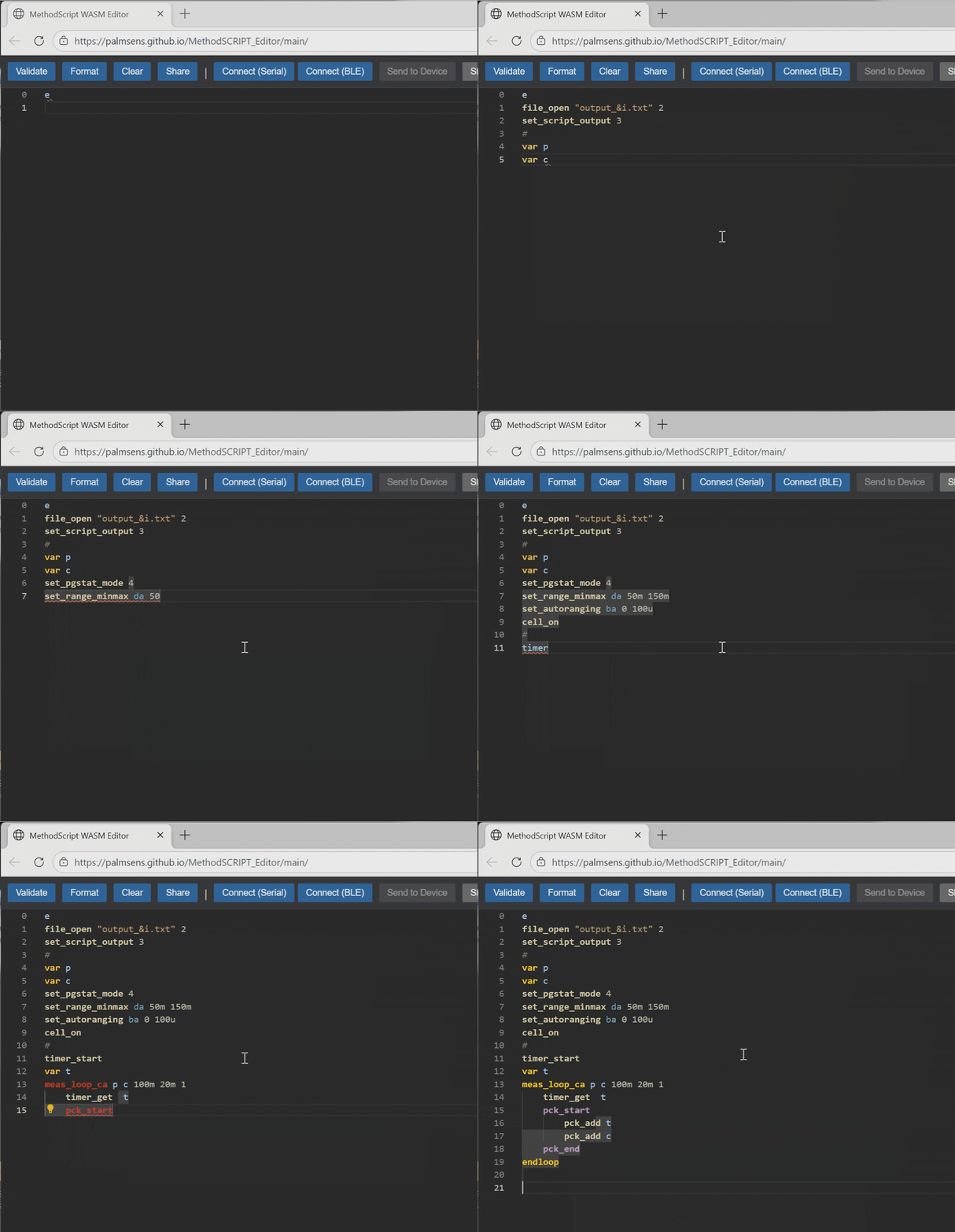
The Online MethodSCRIPT™ Editor is a professional, browser-based environment tailored for direct coding and real-time debugging.
-
Manually write and edit scripts directly in your browser. You can use WebSerial to connect your physical hardware directly to the browser to execute code or use the Virtual EmStat Pico* to test script logic, math operations, variable storage, and array handling without needing any physical hardware on your desk.
-
Drastically increase your manual coding speed and accuracy with context-aware IntelliSense, providing real-time auto-completion for commands and arguments, including shorthand unit multipliers (SI prefixes). The built-in terminal console provides instant Real-Time Debugging by displaying raw data output packages as they arrive from the instrument.
-
Use this environment to fine-tune timing-critical scripts or utilize advanced commands, like FastMode to disable idle status packages, and optimize instrument response times for your final production code.
|
Virtual hardware is for code validation and unlike a physical device it does not simulate physical electrochemical cell responses. |
From Scripting to Integration
Once you have refined your script using one of the three approaches above, integrating it into your own software environment is a straightforward process. MethodSCRIPT™ is designed to be platform agnostic, meaning it works the same way whether you are using a PC, a programmable logic controller (PLC), or a custom microcontroller.
-
Communication Protocol: MethodSCRIPT™ is sent as plain text over the device’s serial or Bluetooth connection. It operates using a simple protocol that transitions the device from an idle state to execution mode. The device then compiles and executes the code locally, allowing the hardware to manage precise timing, loops, and conditional logic without needing further intervention or continuous communication from the host.
-
Handling Measurement Data: The device returns results in standardized data packages that are easy for software to parse. These packages contain both the measured values (like current or potential) and important metadata, such as status flags for overloads or timing issues. While the raw data uses a specific format for efficiency, our provided libraries handle this conversion for you automatically.
-
Using Code Examples: You do not need to build your integration from scratch. We provide extensive code libraries on the PalmSens GitHub to help you get started immediately. Ready-to-run examples are available for Python, C and Arduino (C++), which demonstrate all the basic functions such as how to open a connection, send a script string, and convert the returned data packages into usable numeric values or plots.
Additional Resources
To support your development process, we provide comprehensive documentation and open-source code repositories that allow you to move from initial script testing to full application integration.
-
MethodSCRIPT™ Manual: The primary technical reference for the language, containing a complete summary of every command, detailed descriptions of variable types, and an extensive lookup table for error codes to help you troubleshoot during development.
-
MethodSCRIPT™ Examples and GitHub Code Repository: The MethodSCRIPT™ Examples page and GitHub Repository together provide practical advice, language-specific templates in languages including Arduino, C and Python. These examples get you started by demonstrating how to handle communication with the instrument and provide logic for parsing raw measurement data into usable values for your application.
-
MethodSCRIPT™ Tips & Tricks: A guide with practical advice for creating and debugging your first script hosted on PalmSens’ Knowledge Base. It offers essential techniques for solving communication errors and visualizing your measurement results. These tips are there to help you communicate directly with supported hardware from any operating system or microcontroller.
-
PSTrace 5 User Manual: Available within your PSTrace software installation, it provides full guidance on using PalmSens’ primary software interface. This manual includes specific instructions on how to use the MethodSCRIPT™ Sandbox and how to generate scripts directly from the Method Editor.